
Using callbacks in objectives
This notebook explains how to use a callback in an objective function. For details on the Callback class, see the API reference. Potential use cases for this are:
Plotting some outputs at each iteration of the optimization
Saving internal variables to plot once the optimization is complete
Some objectives have “internal callbacks” which are not intended to be user facing. These are standard callbacks that can be used to plot the results of an optimization by using DataFit.plot_fit_results(). For user-facing callbacks, users should create their own callback objects and call them directly for plotting, as demonstrated in this notebook.
Creating a custom callback
To implement a custom callback, create a class that inherits from iwp.callbacks.Callback and calls some specific functions. See the documentation for iwp.callbacks.Callback for more information on the available functions and their expected inputs.
import ionworkspipeline as iwp
import matplotlib.pyplot as plt
import numpy as np
import pandas as pd
import pybamm
/Users/runner/work/ionworks-app/ionworks-app/.venv/lib/python3.12/site-packages/tqdm/auto.py:21: TqdmWarning: IProgress not found. Please update jupyter and ipywidgets. See https://ipywidgets.readthedocs.io/en/stable/user_install.html
  from .autonotebook import tqdm as notebook_tqdm
class MyCallback(iwp.callbacks.Callback):
    def __init__(self):
        super().__init__()
        # Implement our own iteration counter
        self.iter = 0

    def on_objective_build(self, logs):
        self.data_ = logs["data"]

    def on_run_iteration(self, logs):
        # Print some information at each iteration
        inputs = logs["inputs"]
        V_model = logs["outputs"]["Voltage [V]"]
        V_data = self.data_["Voltage [V]"]

        # calculate RMSE, note this is not necessarily the cost function used in the optimization
        rmse = np.sqrt(np.nanmean((V_model - V_data) ** 2))

        print(f"Iteration: {self.iter}, Inputs: {inputs}, RMSE: {rmse}")
        self.iter += 1

    def on_datafit_finish(self, logs):
        self.fit_results_ = logs

    def plot_fit_results(self):
        """
        Plot the fit results.
        """
        data = self.data_
        fit = self.fit_results_["outputs"]

        fit_results = {
            "data": (data["Time [s]"], data["Voltage [V]"]),
            "fit": (fit["Time [s]"], fit["Voltage [V]"]),
        }

        markers = {"data": "o", "fit": "--"}
        colors = {"data": "k", "fit": "tab:red"}
        fig, ax = plt.subplots()
        for name, (t, V) in fit_results.items():
            ax.plot(
                t,
                V,
                markers[name],
                label=name,
                color=colors[name],
                mfc="none",
                linewidth=2,
            )
        ax.grid(alpha=0.5)
        ax.set_xlabel("Time [s]")
        ax.set_ylabel("Voltage [V]")
        ax.legend()

        return fig, ax
To use this callback, we generate synthetic data for a current-driven experiment and fit a SPM using the CurrentDriven objective.
model = pybamm.lithium_ion.SPM()
parameter_values = iwp.ParameterValues("Chen2020")
t = np.linspace(0, 3600, 1000)
sim = iwp.Simulation(model, parameter_values=parameter_values, t_eval=t, t_interp=t)
sim.solve()
data = pd.DataFrame(
    {x: sim.solution[x].entries for x in ["Time [s]", "Current [A]", "Voltage [V]"]}
)

# In this example we just fit the diffusivity in the positive electrode
parameters = {
    "Positive particle diffusivity [m2.s-1]": iwp.Parameter("D_s", initial_value=1e-15),
}

# Create the callback
callback = MyCallback()
objective = iwp.objectives.CurrentDriven(
    data, options={"model": model}, callbacks=callback
)
current_driven = iwp.DataFit(objective, parameters=parameters)

# make sure we're not accidentally initializing with the correct values by passing
# them in
params_for_pipeline = {k: v for k, v in parameter_values.items() if k not in parameters}

results = current_driven.run(params_for_pipeline)
Iteration: 0, Inputs: {'D_s': np.float64(1e-15)}, RMSE: 41386.36980670669
Iteration: 1, Inputs: {'D_s': np.float64(1e-15)}, RMSE: 41386.36980670669
Iteration: 2, Inputs: {'D_s': np.float64(1e-15)}, RMSE: 41386.36980670669
Iteration: 3, Inputs: {'D_s': np.float64(2e-15)}, RMSE: 0.0645624103684898
Iteration: 4, Inputs: {'D_s': np.float64(0.0)}, RMSE: 2.2972290818330383
Iteration: 5, Inputs: {'D_s': np.float64(3.0000000000000002e-15)}, RMSE: 0.022989961193077398
Iteration: 6, Inputs: {'D_s': np.float64(2.50000000000225e-15)}, RMSE: 0.04021882397498576
Iteration: 7, Inputs: {'D_s': np.float64(3.2500000000000004e-15)}, RMSE: 0.016096469388094913
Iteration: 8, Inputs: {'D_s': np.float64(3.5e-15)}, RMSE: 0.010061545146754166
Iteration: 9, Inputs: {'D_s': np.float64(3.6e-15)}, RMSE: 0.007853069625410424
Iteration: 10, Inputs: {'D_s': np.float64(3.7e-15)}, RMSE: 0.0057495886284069046
Iteration: 11, Inputs: {'D_s': np.float64(3.8136655187140655e-15)}, RMSE: 0.0034770086124377812
Iteration: 12, Inputs: {'D_s': np.float64(3.950699955832193e-15)}, RMSE: 0.0008916111998283838
Iteration: 13, Inputs: {'D_s': np.float64(4.050699955832193e-15)}, RMSE: 0.0008966251649564456
Iteration: 14, Inputs: {'D_s': np.float64(4.000571168349029e-15)}, RMSE: 1.0262137224036045e-05
Iteration: 15, Inputs: {'D_s': np.float64(4.010571168349029e-15)}, RMSE: 0.00018858165680854546
Iteration: 16, Inputs: {'D_s': np.float64(3.9905711683490296e-15)}, RMSE: 0.0001690553057016437
Iteration: 17, Inputs: {'D_s': np.float64(4.0000250152201685e-15)}, RMSE: 1.485082019592362e-06
Iteration: 18, Inputs: {'D_s': np.float64(3.999025015220169e-15)}, RMSE: 1.7553276435674975e-05
Iteration: 19, Inputs: {'D_s': np.float64(3.999925015220168e-15)}, RMSE: 1.99812947015305e-06
Iteration: 20, Inputs: {'D_s': np.float64(4.0001250152201686e-15)}, RMSE: 2.6107856848088557e-06
Iteration: 21, Inputs: {'D_s': np.float64(4.000002947582353e-15)}, RMSE: 1.4316629451074456e-06
Iteration: 22, Inputs: {'D_s': np.float64(3.9999929475823535e-15)}, RMSE: 1.4427877993135503e-06
Iteration: 23, Inputs: {'D_s': np.float64(4.000012947582353e-15)}, RMSE: 1.4427961357452912e-06
Iteration: 24, Inputs: {'D_s': np.float64(4.0000019475823535e-15)}, RMSE: 1.4317742383508753e-06
Iteration: 25, Inputs: {'D_s': np.float64(4.000003947582354e-15)}, RMSE: 1.4317750884725195e-06
Iteration: 26, Inputs: {'D_s': np.float64(4.000002947582353e-15)}, RMSE: 1.4316629451074456e-06
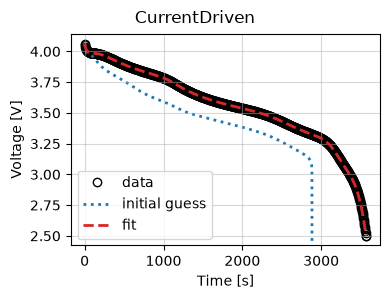
Now we use the results to plot the fit at the end of the optimization.
_ = results.plot_fit_results()
Cost logger
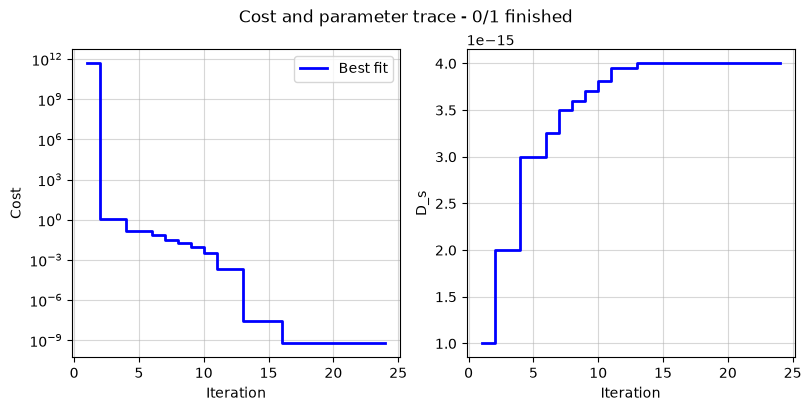
The DataFit class has an internal “cost-logger” attribute that can be used to log and visualize the cost function during optimization. This is useful for monitoring the progress of the optimization. The cost logger is a dictionary that stores the cost function value at each iteration. The cost logger can be accessed using the cost_logger attribute of the DataFit object.
By default, the cost logger tracks the cost function value. DataFit.plot_trace can be used the plot the progress at the end of the optimization.
objective = iwp.objectives.CurrentDriven(data, options={"model": model})
current_driven = iwp.DataFit(objective, parameters=parameters)
_ = current_driven.run(params_for_pipeline)
_ = current_driven.plot_trace()
The cost logger can be changed by passing the cost_logger argument to the DataFit object. For example, the following example shows how to pass a cost logger that plots the cost function and parameter values every 10 seconds.
current_driven = iwp.DataFit(
    objective,
    parameters=parameters,
    cost_logger=iwp.CostLogger(plot_every=10),
)